AUTHOR

おじゃち

Why Shopify or Etsy Icons Change When You Add a Shop to Your Home Screen

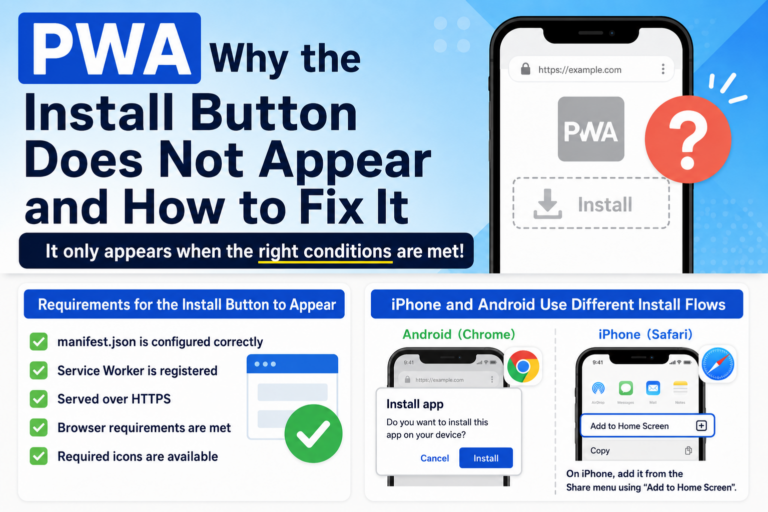
Why Shopify or Etsy Shop Icons Change When Added to the Home Screen If you run an online shop on platforms like Shopify or Etsy, you may have noticed something frustrating: **“When customers add my shop to their iPhone Home Screen, the icon becomes the Shopify/Etsy logo instead of my brand.”** In this article, we explain why your shop cannot use its own icon by default and how you can let customers add your shop to their Home Screen using your own branding. Why Shopify and Etsy Icons Don’t Use Your Shop Logo When an iPhone user selects “Add to Home Screen,” Safari looks for a specific file on the website: apple-touch-icon This file determines the icon shown on the Home Screen. Because Shopify and Etsy set this icon at the **platform level**, the Home Screen icon becomes: Shopify → the Shopify default icon Etsy → the Etsy logo Your shop page is treated as a part of the platform—not an independent website— so iOS does not use a shop-specific icon. Why This Is a Problem for Shop Owners Having customers save your shop to their Home Screen can be valuable, but: Every saved shop looks identical (all Shopify or […]

Shortcut Method vs OJapp: Which Is the Best Way to Add Custom Icons to Your iPhone Home Screen?

Shortcut Method vs OJapp: A Complete Comparison for Custom iPhone Icons When it comes to customizing iPhone Home Screen icons, the most well-known solution is using the **Shortcuts app**. However, many users quickly notice that the Shortcut method can be confusing, slow, and difficult to recommend to others. In this guide, we compare the Shortcut method and the OJapp approach across five key factors— ease of setup, shareability, speed, consistency, and safety— to help you understand which method is better for your needs. What Is the Shortcut Method? The Shortcut method uses the built-in iOS “Shortcuts” app to create a custom icon that launches a URL or app via an automation-like shortcut. While highly customizable, it comes with several drawbacks—especially for beginners. Advantages of the Shortcut Method Allows complete freedom when choosing icons Uses built-in iOS functionality—no installation required Supports URL schemes for opening apps directly It works especially well for people who want to **retheme their entire Home Screen with matching icons**. Disadvantages of the Shortcut Method Setup is complicated and hard for beginners Shortcuts cannot be shared as ready-to-use icons(users must recreate the setup) A Shortcuts screen flashes briefly when launching the icon Managing multiple URLs becomes tedious […]

Shortcut vs Web App vs OJapp: A Complete Comparison for Home Screen Icon Customization

Shortcut vs Web App vs OJapp — A Complete Comparison When adding a website to your iPhone or Android home screen, there are actually three major methods: ① Shortcut Method (iPhone’s automation-based icon customization) ② Standard Web App “Add to Home Screen” ③ OJapp Method (custom icon + custom name + sharable setup) This article organizes what each method can and cannot do, so you can choose the best option for your purpose. ① What Is the Shortcut Method? Using the iPhone’s built-in “Shortcuts” app, you can create a pseudo-app with any icon and any name you like. Pros Full freedom to choose the icon You can rename it to anything Great for people who want to unify their home screen theme Cons Setup is complicated, especially for beginners Cannot be shared — the other person must recreate it manually A Shortcut screen flashes briefly on launch You must recreate everything when changing devices → Good for personal use, but too much hassle to recommend to others. ② Standard Web App “Add to Home Screen” This is the simplest way, available on both iPhone and Android through Safari or Chrome. Pros Extremely easy — only a few seconds Fast launch […]

>OJapp / Petal

OJapp / Petal

OJappは、Webページをそのままホーム画面に置ける仕組みを提供しています。
Petalは、その仕組みを使って “人のページを名刺のように持つ”ためのサービスです。
QRからすぐ開けて、ログインなしでも見れる。 でも、必要なときだけつながれる。
そんな「弱いつながり」を残すために作られています。

CTR IMG