CATEGORY

English Articles

How PWA Offline Support Works: Service Workers, Cache API, and Files to Cache

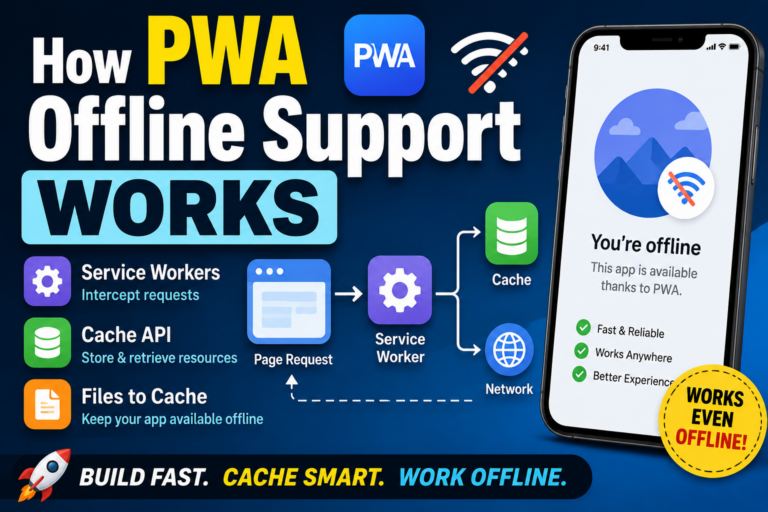
How PWA Offline Support Works: Service Workers, Cache API, and Files to Cache Conclusion: PWA offline support works by saving required files in advance To make a PWA work offline, you usually use a Service Worker. In simple terms, the browser saves files such as HTML, CSS, JavaScript, and images in advance. Then, when there is no network connection, the app can display the page using those saved files. So PWA offline support is not magic. It works because the files needed to run the app have already been cached. What you need for offline support When you add offline support to a PWA, there are three main things to think about. Service Worker Cache API A list of files to cache A Service Worker works like a background layer between the page and the network. When the page tries to load a file, the Service Worker can decide whether to fetch it from the network or return a saved version from the cache. What does a Service Worker actually do? A Service Worker is different from regular JavaScript. It is not mainly used to move buttons or update UI elements on the page. It is used to manage network […]

Why the PWA Install Button Does Not Appear: Common Causes and Fixes

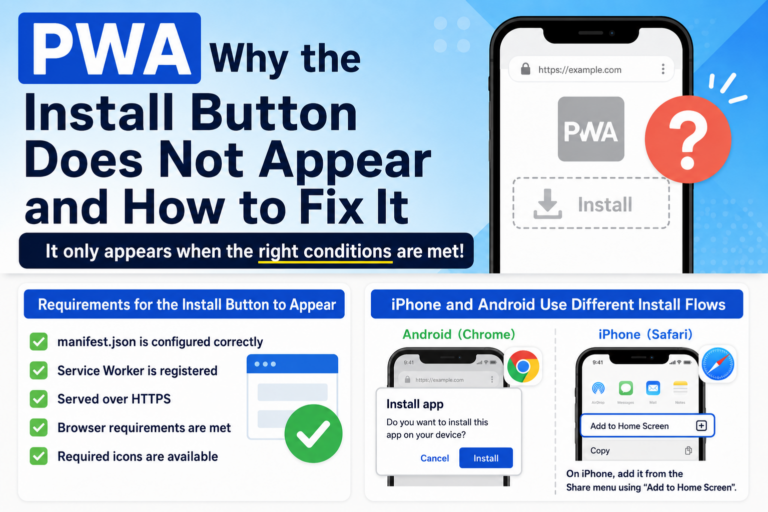
Why the PWA Install Button Does Not Appear: Common Causes and Fixes Conclusion: the PWA install button only appears when the right conditions are met You may build what looks like a PWA, open it on a phone or PC, and still not see an install button. In most cases, this is not exactly a bug. It usually means the browser does not yet recognize the site as an installable web app. The common causes are a missing or incorrect manifest.json, an unregistered Service Worker, a non-HTTPS environment, or browser-specific install requirements that are not being met. A problem I ran into more than once While testing PWA behavior myself, I often hit the same confusing situation: the manifest was there, the page worked, but the browser still would not offer installation. That is what makes this problem annoying. From the outside, the site may look perfectly fine. But a PWA is not complete just because the HTML page works. The browser has to decide, “this is an installable web app.” If one required piece is missing, the install prompt may never appear. Cause 1: manifest.json is not being loaded correctly For a PWA, the Web App Manifest is one […]

Is PWA Dead? The Reality in 2026 and How to Use It Correctly

Is PWA Dead? The Reality in 2026 and How to Use It Correctly “Is PWA dead?” A few years ago, Progressive Web Apps were expected to replace native apps. The idea was simple: build once on the web, and deliver an app-like experience everywhere. But in 2026, the situation looks very different. PWA is not dead. But the assumptions behind it have completely changed. 1. Why PWA Was So Promising PWA was designed to bring app-like capabilities to the web. No installation required Distributed via URL Offline support Push notifications In theory, this meant you could replace native apps with a single web-based solution. At the time, many believed that app stores might eventually become unnecessary. 2. The Reality in 2026: A Split Ecosystem Today, PWA behaves very differently depending on the platform. iOS (iPhone) Limited PWA support Unstable Service Worker behavior Offline features are not reliable Push notifications are restricted As a result, PWA does not fully work as an app replacement on iOS. Android Stable Service Worker support Reliable offline capabilities Working push notifications Near-native app experience On Android, PWA is still a practical and powerful solution. In other words, PWA didn’t fail — it split into two […]

Scroll Speed & SEO: How Many Seconds Until Readers Leave? (2026 Guide)

Scroll Speed & SEO: How Many Seconds Until Readers Leave? (2026 Guide) In the mobile-first SEO era, one UX factor is gaining major importance: scroll speed. How fast users move through your page — or whether they scroll at all — directly affects engagement signals that influence SEO. Google does not officially list scroll speed as a ranking factor. However, it strongly impacts dwell time, bounce rate, and completion rate, making it an indirect but powerful SEO element. 1. How many seconds before users leave? New 2026 data Recent studies show that most mobile readers decide whether to stay or leave within 3–7 seconds. The reason is simple: readers judge the article based on the first screen — the “above the fold” area. Hard to read Unclear value Heavy layout or slow rendering Dense or intimidating text If the first impression fails, users will not scroll at all. In other words, the first few seconds of scrolling behavior predict SEO performance. 2. Scroll speed reflects “readability” of the article Smooth scrolling usually means the reader is following the content naturally. Stalled or choppy scrolling means the content is hard to digest. Common causes of scroll interruptions Paragraphs that are too […]

Home Screen Design Guide: Best Image Sizes for Icons, Wallpapers, and Widgets (Made on Your Phone)

Home Screen Design Guide: Best Image Sizes for Icons, Wallpapers, and Widgets (Made on Your Phone) If you want to make your iPhone or Android home screen look beautiful, knowing the optimal image sizes makes everything cleaner and easier. Wallpapers, icons, widgets — each element has a recommended image size that prevents distortion and keeps your layout consistent. This guide summarizes the essential image sizes for anyone designing a home screen directly on their phone. 1. Best Image Size for Home Screen Icons (Web Icons) When saving a web icon (WebClip) to your home screen, use: 1024 × 1024 px (recommended) PNG format (transparent background allowed) No need for rounded corners — iPhone applies them automatically The 1024px size ensures crisp visuals on both iPhone and Android. OJapp also uses this size as the default for icon generation. Note: White backgrounds + thin lines may appear faint when shrunk. High contrast and clear shapes are safer. 2. Best Wallpaper Sizes for iPhone (Lock Screen / Home Screen) Modern iPhones use high-resolution wallpapers. Examples: 1290 × 2796 px (iPhone 15 Pro Max) 1179 × 2556 px (iPhone 15 / 15 Pro) Even if you create an image that perfectly matches the […]

The Correct Way to Save Images on Your Phone: Why “Long-Press Save” Is the Fastest and Most Reliable Method

The Correct Way to Save Images on Your Phone: Why “Long-Press Save” Is the Fastest and Most Reliable Method When saving images on iPhone or Android, the long-press save method is actually the fastest, safest, and most reliable option. Many users experience the common problem: “I downloaded the image, but it’s not in my Photos app.” This guide explains why long-press saving solves that issue 100% of the time. Conclusion First: Long-Press Saving Is Always the Correct Choice Long-press saving guarantees that the image: Goes directly into the Photos app Never gets lost in the Downloads folder Requires no extra steps Works consistently across Safari and Chrome In contrast, the “Download” button does not save images to Photos—it saves them to the device’s file system, which is why many beginners cannot find their images afterward. Why the “Download” Button Causes So Much Confusion On both iPhone and Android, downloads go to a completely different place from photos: iPhone: Files app → Downloads folder Android: Internal storage → Download folder Most users expect downloaded images to appear in the Photos app… but they don’t. This is the root cause of the common complaint: “I saved it, but it’s not there!” The […]

SameSite Cookies Explained for Beginners: A Simple Visual Guide

SameSite Cookies Explained for Beginners: A Simple Visual Guide The SameSite attribute sounds technical, but the idea behind it is actually simple. It controls when a browser is allowed to send your cookies. Modern browsers like Chrome changed their default behavior, which is why cookies are no longer sent automatically across different websites. This guide uses simple visual explanations to help beginners understand the difference between SameSite=Lax, Strict, and None. What Is the SameSite Attribute? SameSite decides under what conditions a cookie will be sent. Before SameSite became strict, cookies were sent everywhere — even when loading images or iframes from another domain. That made cross-site tracking extremely easy. SameSite fixes this by giving browsers clear rules. Visual Guide: The 3 SameSite Modes ::contentReference[oaicite:0]{index=0} SameSite has only three values: Strict — most restrictive Lax — the modern default None — for third-party cookies (requires Secure) ① SameSite=Strict — “Only from your own site.” Strict means the cookie is sent ONLY when navigating inside the same site. For example, a cookie from example.com will: ✔ Send when browsing inside example.com ✘ NOT send when coming from another site’s link ✘ NOT send inside iframes, images, or scripts This is very secure, […]

The Real Reason Cookie Consent Banners Exist: GDPR, Tracking, and Modern Web Regulations Explained

The Real Reason Cookie Consent Banners Exist: GDPR, Tracking, and Web Regulations Explained Cookie consent banners appear on almost every website today. Many beginners hear, “It’s because of GDPR,” but the real reason is deeper: a mix of web technology, privacy regulations, and modern tracking limits. This article explains, in an intermediate and developer-friendly way, why cookie consent is required and what technical changes created this situation. 1. The Critical Difference: First-Party vs Third-Party Cookies The cookie debate is not about cookies themselves, but who creates them and what they’re used for. ① First-Party Cookies Created by the website you are currently viewing Used for login sessions, language settings, shopping carts, etc. GDPR considers them “essential” → consent not required ② Third-Party Cookies Created by external services (ads, analytics, tracking scripts) Can follow users across multiple websites GDPR requires explicit consent Cookie banners exist mainly because of third-party cookies. 2. GDPR Requires “Transparency and Choice” Under GDPR (2018), websites must: Explain why data is collected Allow users to accept or reject tracking cookies Gain explicit consent before using non-essential cookies Because websites serve users globally, GDPR rules effectively became worldwide standards. 3. The ePrivacy Directive (“Cookie Law”) Adds More Rules […]

Why Do Websites Ask “Do You Accept Cookies?” So Often Now? A Beginner-Friendly Guide

Why Do Websites Ask “Do You Accept Cookies?” So Often Now? A Beginner-Friendly Guide If you browse the web on your phone or computer, you’ve probably noticed that almost every website now asks: “Do you accept cookies?” Years ago, these pop-ups barely existed. So why are they everywhere today? This article explains, in simple terms, what cookies are, why websites ask for permission, and what is safe or risky to allow. What Are Cookies? Cookies are small pieces of data that websites save on your device. Think of them as tiny notes that help the site remember things. Keeping you logged in Saving your language preference Remembering what’s in your shopping cart In other words, cookies are simply a tool that helps websites work smoothly. → By themselves, cookies are not dangerous. So Why Do Websites Ask for Permission Now? The short answer: because privacy laws became much stricter. The biggest change came from Europe’s law called GDPR (General Data Protection Regulation). GDPR requires websites to: Explain what data is collected Ask for permission before tracking users Allow users to reject non-essential cookies Because the internet is global, websites worldwide now follow these rules — which is why cookie pop-ups […]

When to Clear Your Cache — and When You Definitely Shouldn’t

When to Clear Your Cache — and When You Definitely Shouldn’t Many users delete their browser cache the moment something “feels wrong.” But cache plays an important role, and deleting it too often can slow things down or even break certain web apps. As someone who builds Web tools and has manually cleared Safari cache hundreds of times while debugging, here’s a practical guide on when you should clear your cache — and when you absolutely shouldn’t. When You SHOULD Clear Cache 1. When a Website Update Isn’t Showing If HTML, CSS, or JS changes aren’t appearing, cache is almost always the reason — especially on iOS Safari, which holds onto files aggressively. Icons not updating CSS changes not appearing JavaScript still running old code For developers: clearing the cache for only the affected domain is the most effective approach. 2. When a WebClip (Home Screen Icon) Refuses to Update iOS uses a separate “shadow cache” for WebClip icons, which is NOT cleared by normal cache deletion. To fix this, go to: Settings → Safari → Advanced → Website Data → Delete the specific domain. This method has a 100% success rate during development. 3. When a Page Looks Broken […]

>OJapp / Petal

OJapp / Petal

OJappは、Webページをそのままホーム画面に置ける仕組みを提供しています。
Petalは、その仕組みを使って “人のページを名刺のように持つ”ためのサービスです。
QRからすぐ開けて、ログインなしでも見れる。 でも、必要なときだけつながれる。
そんな「弱いつながり」を残すために作られています。

CTR IMG