

This site uses the original WordPress plugin OJapp PWA Marketing.
Each article can be added to your Home Screen with its own dedicated icon.
- 1 The manifest.json id Trap: How to Avoid Duplicate PWA Install Problems
- 1.1 What is the manifest.json id?
- 1.2 The problem with fixed id values
- 1.3 The simple pattern that worked: remove id and use start_url: “.”
- 1.4 Why this works
- 1.5 Why this matters for Service Worker and offline support
- 1.6 Why this is useful for Petal-style digital card pages
- 1.7 When you should use a fixed id
- 1.8 When you may want to avoid id
- 1.9 The real lesson from PWA LAB
- 1.10 Summary
The manifest.json id Trap: How to Avoid Duplicate PWA Install Problems
In a PWA manifest, there is a field called id.
When you first start building PWAs, you usually focus on name, start_url, display, and icons. To be honest, because a PWA can work without id, it is easy to think, “Do I really need this?”
But when you want to handle multiple PWAs on the same domain, or generate app-like entries for each user, this id field can suddenly become a huge wall.
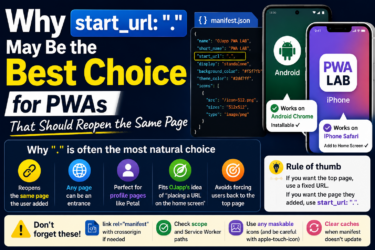
After a lot of rough testing in PWA LAB, I ended up with one very simple pattern: remove id and use start_url: ".".
This article explains why that can help when you want multiple PWA-style icons from the same domain.
What is the manifest.json id?
id is the value used to identify a PWA.
The browser uses it to decide whether the app being installed is the same app as one already installed, or a completely new app.
In other words, it is like a name tag for the PWA.
If the browser thinks the PWA has the same identity, it may treat it as an update to an existing app instead of a new install.
The problem with fixed id values
In many official examples and technical guides, using a fixed id is recommended.
The idea is simple: even if the URL changes later, the browser can still recognize the installed PWA as the same app.
For a normal company website or a single web app, that is usually the right approach.
But the problem appears when you want to install multiple PWA-like entries from the same domain.
For example:
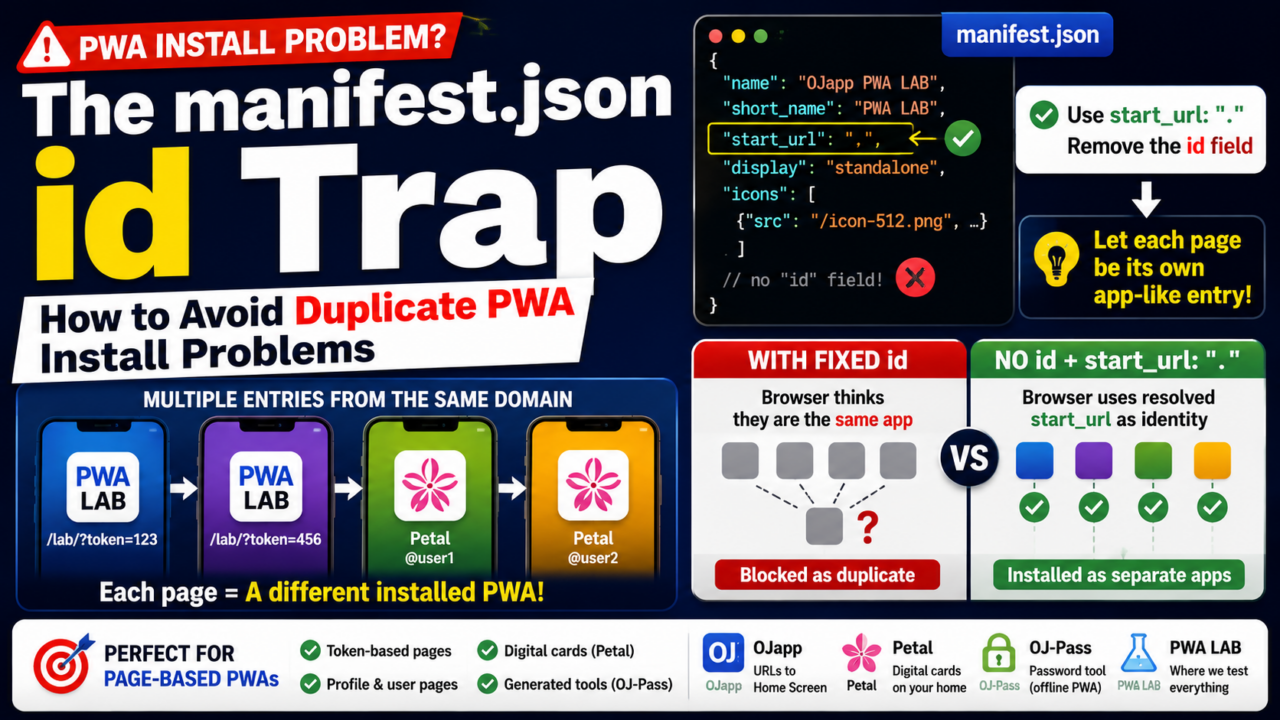
/lab/?token=123: an experimental PWA for user A/lab/?token=456: an experimental PWA for user B/petal/@user1: person A’s digital card page/petal/@user2: person B’s digital card page
In this kind of structure, the user does not want one single app.
They want each page, token, profile, or card to become a separate home screen entrance.
But if you fix the id, the browser may decide that all of them are the same app.
Even if you try to dynamically change the id, there can still be cases where the browser sees the shared origin, manifest behavior, or Service Worker relationship and blocks duplicate installs.
That is when you may see behavior like “this app is already installed.”
 What PWAs Can and Cannot Do on iOS in 2026: A Complete Practical Guide
The simple pattern that worked: remove id and use start_url: “.”
The pattern that worked best in my PWA LAB testing was this:
"start_url": "."And the important part is this:
Do not write the id field in the manifest.
That means the manifest does not explicitly say, “this is the fixed identity of the app.”
Instead, the browser has to derive the app identity from other manifest information.
Why this works
start_url and id have different roles.
But when id is not written in the manifest, the browser can use the resolved start_url as part of the app identity.
That is where start_url: "." becomes interesting.
Because "." is relative, the resolved start URL can depend on the page context where the manifest is used.
For example:
- Opened from
/lab/?token=123→ treated as a different entry - Opened from
/lab/?token=456→ treated as another entry
Instead of writing complex JavaScript to generate a unique app identity, the browser can resolve the current context into a different start URL.
As a result, pages that would otherwise be grouped together may be treated as separate install targets.
That is the important trick.
Why this matters for Service Worker and offline support
The nice part is that this approach can still work with a shared Service Worker scope.
For example, many generated pages can still live under a shared path such as /lab/.
That means they can still be controlled by the same Service Worker, cache rules, and offline behavior.
So the structure becomes something like this:
- During installation, each page can behave like a separate home screen entrance
- During offline use, the shared Service Worker can still serve cached files
This is a strong fit for token-based tools, generated pages, and small app-like pages that share the same technical base.
It is not the normal “one website, one app” model.
It is closer to “one system, many home screen entrances.”
Why this is useful for Petal-style digital card pages
This idea is especially useful for a service like Petal.
In Petal, the user may want to place someone’s digital card page on the home screen.
They are not trying to install the whole Petal service every time.
They want a shortcut-like app entrance for a specific person.
For example, one person’s card, another person’s card, a profile page, or a small personal entrance.
If all of those are treated as the same PWA, the experience breaks.
But if each URL can become its own home screen entry, the experience makes much more sense.
This also connects to the original idea behind OJapp: placing URLs on the home screen as app-like entrances.
In that kind of design, fixing id too strongly can work against the product.
When you should use a fixed id
This does not mean fixed id is bad.
For many PWAs, it is the correct choice.
A fixed id is a good fit when:
- You want one website to become one installed app
- You want the app identity to stay stable even if URLs change
- You do not want users to install multiple versions from the same service
- You are building a dashboard, company app, admin tool, or normal web app
In these cases, writing a stable id is clean and predictable.
It helps the browser understand that the app is the same app over time.
When you may want to avoid id
On the other hand, avoiding id and using start_url: "." may be a better fit when:
- You want each token URL to become a separate home screen entry
- You want user pages or profile pages to be installed separately
- You are building digital cards, rooms, generated tools, or personal pages
- You want “the page the user added” to reopen later
- You want multiple PWA-like icons from the same domain
In this type of product, the normal fixed-app model is too rigid.
The goal is not one app. The goal is many small entrances.
The real lesson from PWA LAB
What I learned from PWA LAB is that PWA behavior is not only about writing the manifest correctly.
It is also about understanding how browsers judge app identity.
id, start_url, Service Worker scope, path structure, and cache behavior all interact.
One setting that is correct for a normal PWA can become a problem for a generated multi-entry PWA.
That is why real-device testing matters so much.
In my case, start_url: "." plus no id worked better than the textbook-style fixed id approach.
Summary
The id field in manifest.json is normally used to keep a PWA’s identity stable.
For a standard app, that is useful.
But for digital cards, token pages, room-style tools, and generated PWA entrances, a fixed id can cause duplicate install problems.
- For a normal single PWA: use a fixed
id - For generated page-based PWAs: consider removing
idand usingstart_url: "."
This small difference can completely change the home screen experience.
PWA design is not only about making one website installable.
Sometimes, the stronger idea is to let each meaningful URL become its own entrance.