CATEGORY

OJapp Dev Log

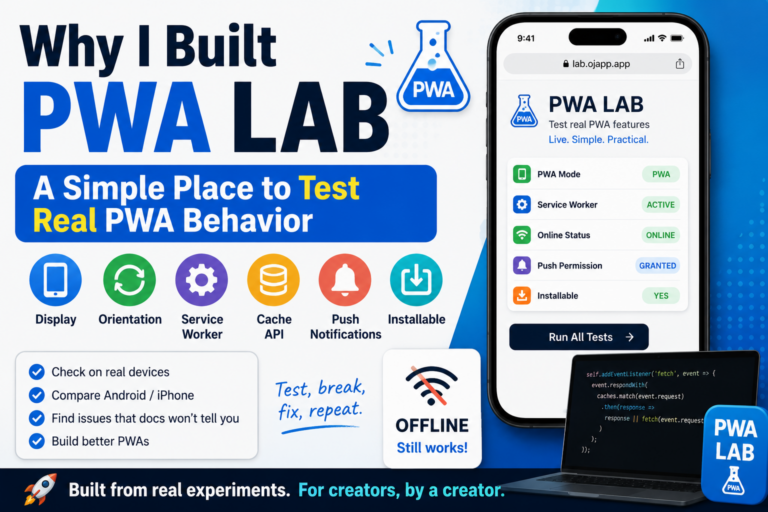
Why I Built PWA LAB: A Simple Place to Test Real PWA Behavior

Why I Built PWA LAB: A Simple Place to Test Real PWA Behavior Why I built PWA LAB While working with PWA behavior and home screen support in OJapp, I kept thinking the same thing. Reading the specification is not enough to understand how it actually behaves. Write a manifest.json, register a Service Worker, set display to standalone, and the site should open like an app. As an explanation, that sounds correct. But when I actually tested it on iPhone and Android, it was not that simple. That is why I built OJapp PWA LAB. PWA LAB is an experiment page for testing PWA settings and status while actually seeing what is happening. Even if you write it by the book, it may not behave the same way A PWA can be made with HTML, manifest.json, and a Service Worker. But in real use, the behavior changes a lot depending on the browser and OS. Something may work well in Android Chrome but not behave as expected in iPhone Safari. Something may look fine on desktop Chrome but appear differently on mobile. The Service Worker may be ACTIVE, but the page may still fail to display correctly offline. These things […]

Why Can’t I Save Images on iPhone? Fix Long Press Not Working (2026 Guide)

Why Can’t I Save Images on iPhone? Fix Long Press Not Working (2026 Guide) “Why can’t I save images on my iPhone?” If you’ve ever tried to save an image from a website and it didn’t work, you’re not alone. Nothing happens when you long press No “Save Image” option appears The image is saved, but you can’t find it The truth is simple: There isn’t just one reason. There are multiple causes—and each requires a different fix. This guide will help you identify the problem and fix it step by step. First: What’s Your Situation? Before trying random fixes, find the situation that matches yours: A: Long press does nothing B: No “Save Image” option appears C: Image is saved but not found D: You’re using an in-app browser (Twitter/X, Instagram, etc.) Jump to the section that matches your issue. A: Long Press Not Working If nothing happens when you press and hold an image, here are the common reasons: 1. The website blocks image saving Some websites intentionally disable long press to prevent copying or downloading images. In this case, there is no direct way to bypass it. 2. It’s not actually an image What looks like an […]

OJapp Splitter Mobile Guide: How to Cleanly Split Photos on Your Phone (Square & 3:4 Only)

OJapp Splitter Mobile Guide: How to Cleanly Split Photos on Your Phone (Square & 3:4 Only) OJapp Splitter is a lightweight web tool designed to split photos on smartphones using only two essential aspect ratios: Square and 3:4. No app installation is required, and the entire process runs on your device, making it fast, private, and easy to use. This guide explains how to make the most of Splitter on your phone. Why OJapp Splitter Uses Only “Square” and “3:4” Unlike many image-editing apps that offer every possible aspect ratio, OJapp Splitter intentionally limits the options to two: Square: Ideal for icons, SNS thumbnails, profile photos 3:4: Matches almost all smartphone photos and feels natural These two ratios cover more than 80% of real-world mobile use cases, allowing the tool to stay fast, simple, and high quality. 4 Practical Mobile Use Cases for OJapp Splitter 1. Create perfectly aligned Instagram posts Instagram looks simple, but its automatic cropping is strict and often unpredictable. Using the 3:4 ratio keeps compositions stable and prevents accidental cropping. With OJapp Splitter, you can easily create: 3-split vertical posts 6-split tall layouts Your images will stay aligned when previewed on your feed, reducing the “why […]

>OJapp / Petal

OJapp / Petal

OJappは、Webページをそのままホーム画面に置ける仕組みを提供しています。
Petalは、その仕組みを使って “人のページを名刺のように持つ”ためのサービスです。
QRからすぐ開けて、ログインなしでも見れる。 でも、必要なときだけつながれる。
そんな「弱いつながり」を残すために作られています。

CTR IMG