This site uses the original WordPress plugin OJapp PWA Marketing.
Each article can be added to your Home Screen with its own dedicated icon.
When people talk about PWAs, the explanation often sounds like this:
Android supports PWAs.
iPhone does not support PWAs very well.
If you only look at the PWA specifications, this explanation is easy to understand.
Android Chrome supports manifest.json, Service Worker, installation, notifications, shortcuts, and many other PWA features quite strongly.
iPhone Safari, on the other hand, does not behave the same way as Android.
But after testing PWAs on both iPhone and Android many times, I started to see the difference in another way.
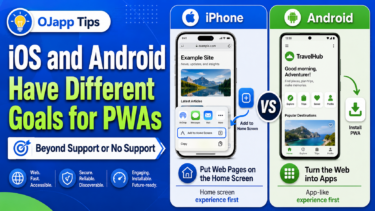
More accurately, Android and iPhone have different goals for PWAs.
That is the biggest difference I noticed while testing repeatedly in PWA LAB.
- 1 Android tries to turn web pages into apps
- 2 iPhone starts from the experience of placing web pages on the home screen
- 3 iPhone is not ignoring PWAs
- 4 Why iPhone PWA behavior feels unique
- 5 If you care about PWA specification support, Android is stronger
- 6 As a home screen experience, iPhone is also very polished
- 7 Android turns the Web into apps, iPhone turns web pages into home screen entries
- 8 For services like Petal, the iPhone way feels very natural
- 9 OJapp is also more about home screen entrances than PWA itself
- 10 In PWA development, the point is not choosing which one is correct
- 11 Related articles
- 12 Summary
Android tries to turn web pages into apps
Android PWAs are clearly designed in the direction of making web pages feel closer to native apps.
The idea is to take a website opened in the browser and move it toward a native-app-like experience.
This direction is very strong on Android.
That is why many PWA-related features are well supported.
- manifest.json
- Service Worker
- Push notifications
- Install Prompt
- Shortcuts
- theme_color
- background_color
- maskable icons
- display modes
- orientation
Of course, it is not perfect.
Manifest cache can be stubborn, multiple PWAs on the same domain can become confusing, and real-device testing can still create plenty of traps.
Even so, when you build according to the PWA specification, Android usually responds in a fairly straightforward way.
For example, if you set display: fullscreen, the app feels much more full-screen.
theme_color is often reflected in the toolbar color.
orientation also works quite strongly on Android.
In other words, for Android, a PWA is an app made from the Web.
iPhone starts from the experience of placing web pages on the home screen
iPhone is different.
Even before the word PWA became common, iOS already had a culture of adding web pages to the home screen.
This is close to the WebClip idea.
You open a page in Safari and place it on the home screen as an icon.
Next time, you tap that icon and open the page directly.
This is not exactly “turning the Web into an app.”
It is more like making a frequently used web page part of the home screen.
That is why iPhone PWAs appear to have a different goal from Android PWAs.
Android tries to move the Web closer to native apps.
iPhone tries to let web pages live naturally on the home screen.
Once you understand this difference, iOS PWA behavior starts to look a little different.
 iOS and Android Have Different Goals for PWAs: The Real Difference Beyond Support or No Support
iPhone is not ignoring PWAs
People often say that iPhone does not support PWAs properly.
But in reality, it is not true that nothing works.
On iPhone, Add to Home Screen, app-like standalone display, short_name, start_url, scope, and icon settings all matter.
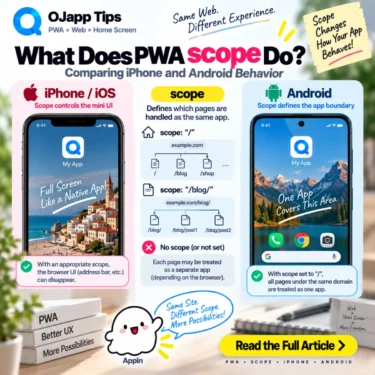
scope is especially important when you actually test it.
While the user stays inside the scope, the app-like appearance is easier to maintain. When the user moves outside the scope, Safari may show a small browser UI.
This would be unlikely if iOS were completely ignoring PWA behavior.
However, these settings do not work in the same way as Android.
Even if you set display: fullscreen or orientation, iPhone does not reflect them as directly as Android.
Maskable icons are also not as important on iPhone as they are on Android.
Instead, apple-touch-icon has a very strong presence.
This is where you can feel iPhone’s own home screen culture.
Why iPhone PWA behavior feels unique
There are several points where PWA developers often get confused on iPhone.
start_urldoes not always feel like it behaves as expectedscopebehaves differently from Androidapple-touch-iconcan feel stronger than manifest icons- Some parts of manifest.json seem to have little effect
displayandorientation, which work on Android, barely change anything on iPhone
It is easy to summarize all of this by saying, “iPhone does not support PWAs.”
But I think the reality is a little more complicated.
Apple seems to treat PWAs less like “apps made from the Web” and more like web pages placed on the home screen.
In other words, Apple may care less about how much of the PWA specification is implemented, and more about what the user intended to place on the home screen.
That is why apple-touch-icon is strong on iPhone.
The home screen icon has to look natural.
That is also why moving outside the scope can show Safari’s mini UI.
The user needs to understand that they have left the thing they placed on the home screen.
When viewed this way, iOS behavior does not look like simple lack of support.
It starts to look like a very Apple-like design choice.
If you care about PWA specification support, Android is stronger
If you judge PWAs purely by specification support, Android is much easier to understand.
You write manifest.json, register a Service Worker, prepare icons, and set display and theme color.
Then the result is usually close to what you expected.
It is also easier for developers to predict.
Chrome DevTools and Lighthouse make it easier to check, and Android follows the textbook PWA flow more clearly.
If you want to make a web app feel truly close to a native app, Android is very strong.
Android PWAs are especially useful for things like:
- Offline tools
- Business apps
- Dashboards
- Input forms
- Web apps that use notifications
- Game-like full-screen experiences
Android is strong at moving the Web toward an app experience.
I think that is clearly true.
As a home screen experience, iPhone is also very polished
However, if you look at PWAs as a home screen experience, iPhone is also very polished.
You open a page in Safari and add it to the home screen from the Share menu.
An icon appears on the home screen.
When you open it, it launches in an app-like view without the URL bar.
This experience feels very natural.
For ordinary users, the question is not whether the manifest is perfectly reflected.
What matters more is whether the thing they placed on the home screen opens naturally.
iPhone feels like it has been polishing that experience for a long time.
Including the rounded icon shape, home screen alignment, and the way a web page blends into the home screen, the experience is very strong.
So iPhone PWAs are not simply worse than Android PWAs.
The goal is different.
Android turns the Web into apps, iPhone turns web pages into home screen entries
To summarize the difference simply:
| Item | Android | iPhone |
|---|---|---|
| Core idea | Turn the Web into apps | Place web pages on the home screen |
| Strong point | PWA specification support | Home screen experience |
| manifest | Works fairly directly | Partly works, but with strong iOS-specific behavior |
| Icons | manifest icons and maskable icons matter | apple-touch-icon is strong |
| display | fullscreen and standalone are easy to see | standalone is the realistic default |
| Best fit | Apps made from the Web | Web pages placed on the home screen |
Android wants to turn the Web into an app.
iPhone wants to make web pages first-class citizens on the home screen.
When you look at it this way, the behavior differences become much easier to understand.
For services like Petal, the iPhone way feels very natural
When I think about this difference, the iPhone way feels very natural for a service like Petal.
Petal is not mainly about placing the service app itself on the home screen.
It is about placing a person’s digital card or personal page on the home screen.
In other words, it is not “launching an app.”
It is closer to “opening a person.”
This idea is closer to the iPhone-style “place a web page on the home screen” than the Android-style “turn the Web into an app.”
You quietly place someone’s page on your own home screen.
You open it with one tap when you need it.
You are not called back by notifications. You remember it yourself and open it.
For this kind of weak-connection design, iPhone’s home screen culture fits surprisingly well.
This is something I would not have noticed just by building a PWA.
I saw it because I built Petal and thought seriously about the experience of placing a person on the home screen.
OJapp is also more about home screen entrances than PWA itself
OJapp is similar.
OJapp is not a service that wants to show off PWA technology itself.
What it wants to do is place URLs on the smartphone home screen and turn websites into app-like entrances.
In other words, it is less about turning the Web into apps and more about creating entrances that can live on the home screen.
This idea is also close to the iPhone way of thinking.
Of course, on Android, it behaves more strongly as a PWA.
But the essence of OJapp is not only whether something can be installed.
It is the culture of placing URLs on the home screen.
From that point of view, the difference between iOS and Android is not just about superiority.
It becomes a difference in what each platform is good at.
In PWA development, the point is not choosing which one is correct
When building a PWA, trying to decide whether Android or iPhone is “correct” usually makes things harder.
If you design only for Android, some settings will not work on iPhone.
If you design only for iPhone, Android may create problems around scope or install detection.
I ran into exactly this issue in PWA LAB.
On iPhone, I wanted a wider scope.
On Android, if the scope is too wide, multiple PWA boundaries can become messy.
It is not that one is right and the other is wrong.
The goals are different.
So what matters is designing separately based on the experience you want to create.
- Use Android’s strong PWA behavior for app-like experiences
- Carefully design the home screen placement experience for iPhone
- Check manifest and scope behavior separately by OS
- Think about icons differently on Android and iPhone
- Always test on real devices
If you start from this premise, it becomes much harder to make the wrong design choice.
Related articles
For a detailed look at what PWAs can do on iPhone, read What PWAs Can and Cannot Do on iOS in 2026.
For the basics of manifest.json, read The Basic manifest.json Settings Required for a PWA.
For the difference between PWA and WebClip, PWA vs WebClip: Which Should You Use on iPhone? is also useful.
Summary
People often say that Android supports PWAs and iPhone does not.
But after testing both, the reality looks a little different.
Android is strong at turning the Web into apps.
iPhone is strong at placing web pages on the home screen.
For Android, a PWA is an app made from the Web.
For iPhone, a PWA is closer to a web page placed on the home screen.
That is why they behave differently.
That is why the same manifest.json does not produce the same result.
What I felt after testing many times in PWA LAB is that iPhone does not fail to understand PWAs.
Apple is giving a different answer from Google.
When viewed that way, iOS-specific behavior becomes much easier to accept.
And when you think about use cases like Petal, where someone’s page is placed on the home screen, the iPhone way can sometimes feel even more natural.
If you judge PWAs only by support or non-support, you miss the real difference.
Android and iPhone have different goals for PWAs.
Starting from that idea makes web app design much more interesting.
Add OJapp Tips as a preferred source on Google
Make it easier to find OJapp Tips articles in Google Search.