PWA vs WebClip: Which One Should You Use on iPhone in 2026?

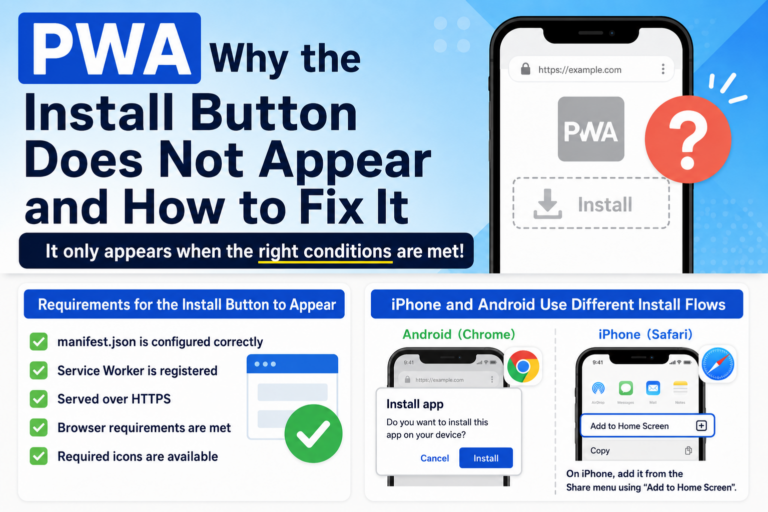
PWA vs WebClip: Which One Should You Use on iPhone in 2026? Both PWA (Progressive Web Apps) and WebClip allow you to place a website on your iPhone home screen. At first glance, they may seem similar—but they are fundamentally different technologies. And in 2026, the answer to “which one should you use?” is almost already decided. What is a PWA? A PWA is a technology that allows websites to behave like native apps. Fullscreen app-like display Offline support Advanced caching with Service Workers In short, it tries to turn the web into an app experience. What is a WebClip? WebClip is a built-in iPhone feature that simply creates a shortcut on your home screen. Opens in Safari No special configuration required Highly stable behavior It’s simple—but reliable. The Reality in 2026 (Key Differences) Feature PWA WebClip iPhone Support Unstable Stable App-like Display Mostly unavailable Not supported Offline Capability Limited None Manifest Support Unreliable Not required Overall Stability Low High As you can see, most advantages of PWA no longer apply on iPhone. Why Did This Happen? After 2024, Apple made major changes to Safari and WebKit, significantly limiting PWA functionality. This caused issues such as: Unstable Service Worker behavior […]

Is PWA Dead on iPhone? The Reality in 2026 and What Still Works

Is PWA Dead on iPhone? The Reality in 2026 and What Still Works “Is PWA still usable on iPhone?” This question has become increasingly common since 2024. Here’s the short answer: PWA is not completely dead—but it no longer works as originally intended on iPhone. In this article, we’ll explain the current state of PWA on iOS and what you can actually do in 2026. 1. PWA Changed Significantly After 2024 In 2024, Apple made major changes to Safari. These changes were driven by regulatory requirements, but they had a huge impact on PWA behavior. Key changes include: Service Workers became unreliable Home screen apps changed their behavior Cache management became restricted As a result, the idea of “web apps behaving like native apps” became much harder to achieve on iPhone. 2. iPhone Now Uses WebClip Instead of Real PWA Today, when you use “Add to Home Screen” on iPhone, it works as a WebClip, not a full PWA. WebClip characteristics: Opens in Safari (not a standalone app) No true offline functionality Most manifest settings are ignored In simple terms, it’s just a shortcut—not a real app experience. 3. Why Some People Still Say “PWA Works” You might hear that […]

Why PWA Doesn’t Work on Safari: The Real Reason on iPhone (2026 Guide)

Why PWA Doesn’t Work on Safari: The Real Reason on iPhone (2026 Guide) “Why doesn’t my PWA work on Safari or iPhone?” This question has become increasingly common since 2024. The short answer is: PWAs no longer function in their original form on Safari. In this article, we explain clearly and simply why PWAs don’t work on Safari, and what actually changed between 2024 and 2026. 1. Safari Never Fully Supported PWAs First, it’s important to understand that Safari has always had limited PWA support. Compared to browsers like Chrome: Service Worker behavior is restricted Push notifications work differently Installation behavior is inconsistent In other words, Safari was never a browser that fully embraced PWAs. 2. Major Changes After 2024 (EU Regulations Impact) In 2024, Apple made significant changes to WebKit (Safari’s engine) to comply with EU regulations. As a result, key PWA features became unstable or stopped working: Service Workers no longer behave reliably Home screen apps lose standalone app behavior Cache behavior becomes inconsistent This didn’t come with a clear “PWA is discontinued” announcement, but the practical effect was the same: PWA became unreliable on Safari. 3. iPhone Now Uses WebClip Instead of Real PWA As of 2026, […]

When Mobile Readers Leave: A Clear Breakdown of Real Drop-Off Moments

When Mobile Readers Leave: A Clear Breakdown of Real Drop-Off Moments Mobile readers are far less patient than desktop users. A single moment of friction—slow loading, confusing UI, or unclear content—can cause immediate drop-off. This article breaks down the exact moments when mobile users decide to leave, based on real browsing behavior patterns. ① Within the First 3 Seconds (Slow Loading) The #1 reason mobile users leave is slow page loading. The screen stays white for more than 3 seconds Images take too long to appear The first contentful paint happens after 5 seconds Mobile users open pages with a “read now” mindset. If they can’t read immediately, they leave. Studies show over half of mobile users leave within 3 seconds of delay. ② The First Screen Didn’t Create Interest On mobile, the first screen decides everything. The title doesn’t match the content The text block looks overwhelming The benefit or conclusion isn’t visible Users aren’t trying to “read”; they’re trying to decide whether this is worth reading. ③ Ads or UI Interrupt Reading Intrusive UI elements cause immediate frustration on small screens. Sudden top banners Giant CTA fixed at the bottom Animations blocking scroll Layouts causing accidental taps The […]

Understanding PWA Cache Strategies: Cache First, Network First, and Stale-While-Revalidate (Beginner-Friendly Guide)

Understanding PWA Cache Strategies: Cache First, Network First, and Stale-While-Revalidate (Beginner-Friendly Guide) Among all PWA features, cache strategy is the part that confuses beginners the most. Service Workers make websites load faster, but they also introduce issues like: “The update didn’t apply” “The old data keeps showing” “The site won’t refresh” This article explains the three major caching strategies used in PWAs: Cache First, Network First, and Stale-While-Revalidate — in a way that even complete beginners can understand. What Is a Cache Strategy? A cache strategy simply defines: “Where should the browser get data from first — the network or the cache?” Because PWAs cache files locally, they can load extremely fast. But if the strategy is wrong, updates fail to appear and the user keeps seeing outdated content. ① Cache First Super fast — but rarely updates. How it works Check the cache first If cached, show it immediately If not cached, fetch from the network and save it Advantages Extremely fast after the first load Great for offline-friendly apps Disadvantages Updates often fail to appear Developers must carefully manage cache invalidation This strategy is not suitable for blogs or frequently updated content. ② Network First Best for websites […]

How PWA Affects SEO: The Real Advantages and Risks in 2026

How PWA Affects SEO: The Real Advantages and Risks in 2026 Progressive Web Apps (PWAs) let websites behave more like native apps. But do they actually help SEO? In this guide, we break down the real impact PWAs have on search rankings—both the benefits and the hidden risks. The Conclusion First: PWAs Do NOT Increase SEO Rankings by Themselves Google has clearly stated: PWA status is not a ranking factor Google does not boost PWA-enabled sites PWA is considered a UX feature, not an SEO feature So installing a manifest.json or Service Worker will not magically increase your rankings. However—PWAs can influence SEO indirectly through speed and engagement. SEO “Benefits” of PWAs 1. Faster Load Speed (Indirect SEO Boost) PWAs can cache resources via a Service Worker, making repeat visits extremely fast. Since Google strongly values speed, this can positively influence SEO metrics. 2. Better User Engagement Lower bounce rate Longer session time Users open the site more often (like an app) These UX improvements are considered positive behavioral signals for Google. 3. Offline Support Although not a direct SEO factor, being able to load content in poor network environments improves the overall user experience. SEO “Risks” of PWAs 1. […]

Safari Officially Ends PWA Support: A Simple Explanation for Everyone (2024 → 2026)

Safari Officially Ends PWA Support: A Simple Explanation for Everyone (2024 → 2026) Between 2024 and 2026, Apple gradually reduced Safari’s support for Progressive Web Apps (PWA), and by 2026 the feature was effectively discontinued. However, news headlines and social media created confusion: “Are PWAs completely gone?” “Does Add to Home Screen stop working?” “Will my website apps break?” This article explains, in simple non-technical terms, what Apple actually ended, what still works, and how the iPhone’s “Add to Home Screen” behaves today. First: What Was a PWA? A PWA (Progressive Web App) was a system that let a website behave like a real app. You could place an icon on the home screen The browser UI disappeared (app-like fullscreen) Offline mode and caching were possible It was a middle ground between “website” and “native app.” 2024: EU regulations trigger major Safari changes In 2024, Apple adjusted Safari and WebKit to comply with European DMA regulations. These changes unintentionally broke several key parts of the PWA system: Service Workers stopped functioning correctly Home-screen apps lost offline storage and notifications PWA behavior differed between EU and non-EU regions This was the moment when “Is PWA dead?” conversations began. 2025: Safari’s PWA […]

Top 10 SEO Mistakes Beginners Make (and Why They Hurt Your Rankings)

Top 10 SEO Mistakes Beginners Make (and Why They Hurt Your Rankings) When you’re new to SEO, it’s easy to do things that seem helpful… but actually lower your search rankings. This article explains the 10 most common “beginner mistakes” and why they backfire. These are simple to fix — changing just a few habits can improve your SEO immediately. 1. Keyword stuffing (adding too many keywords) Many beginners still believe “SEO = put the keyword everywhere,” but in 2026 keyword stuffing is a guaranteed penalty. Makes the content unnatural Reduces readability Signals “manipulation” to Google Natural writing ranks better — period. 2. Titles that are too long or packed with keywords When a title is over 30–40 characters, CTR drops. Google simply cuts off long titles in search results. Short, clear titles perform better. 3. The target keyword doesn’t appear in the title or content A common beginner mistake: You think you’re writing for a keyword, but the keyword never actually appears. Example: You want to rank for “change home screen icon,” but the article never uses that phrase. Google can’t rank what it can’t detect. 4. Believing “longer = better” Old SEO advice claimed that “3,000+ words rank […]

Why AI-Generated SEO Articles Don’t Rank — And How to Fix It (2026 Edition)

Why AI-Generated SEO Articles Don’t Rank — And How to Fix It (2026 Edition) With the rise of ChatGPT and AI writing tools, creating blog posts has become easier than ever. But the reality is this: AI-generated articles often fail to rank well in search engines. In this article, we break down why AI content underperforms and how to turn AI-assisted writing into high-ranking SEO content. 1. The biggest reason AI articles don’t rank: They become “averaged content” AI models generate the most statistically common answer based on huge datasets. This means the output naturally becomes generic and unoriginal. Typical signs of averaged AI content Feels similar to other articles on the web Lacks E-E-A-T (experience, expertise, authoritativeness, trust) No real opinions or insights No personal anecdotes or unique data From 2024–2026, Google increasingly penalizes low-originality pages. Pure AI content falls into this trap almost immediately. 2. Readers want “human experience” — something AI cannot generate Among the E-E-A-T elements, the strongest ranking signal is Experience — actual human involvement. AI has no real experiences, so its writing lacks emotional detail, context, and authentic insights. AI writing often sounds like: “It is generally said that…” “In many cases…” “Typically…” These […]

Scroll Speed & SEO: How Many Seconds Until Readers Leave? (2026 Guide)

Scroll Speed & SEO: How Many Seconds Until Readers Leave? (2026 Guide) In the mobile-first SEO era, one UX factor is gaining major importance: scroll speed. How fast users move through your page — or whether they scroll at all — directly affects engagement signals that influence SEO. Google does not officially list scroll speed as a ranking factor. However, it strongly impacts dwell time, bounce rate, and completion rate, making it an indirect but powerful SEO element. 1. How many seconds before users leave? New 2026 data Recent studies show that most mobile readers decide whether to stay or leave within 3–7 seconds. The reason is simple: readers judge the article based on the first screen — the “above the fold” area. Hard to read Unclear value Heavy layout or slow rendering Dense or intimidating text If the first impression fails, users will not scroll at all. In other words, the first few seconds of scrolling behavior predict SEO performance. 2. Scroll speed reflects “readability” of the article Smooth scrolling usually means the reader is following the content naturally. Stalled or choppy scrolling means the content is hard to digest. Common causes of scroll interruptions Paragraphs that are too […]

>OJapp / Petal

OJapp / Petal

OJappは、Webページをそのままホーム画面に置ける仕組みを提供しています。
Petalは、その仕組みを使って “人のページを名刺のように持つ”ためのサービスです。
QRからすぐ開けて、ログインなしでも見れる。 でも、必要なときだけつながれる。
そんな「弱いつながり」を残すために作られています。

CTR IMG