CATEGORY

PWA

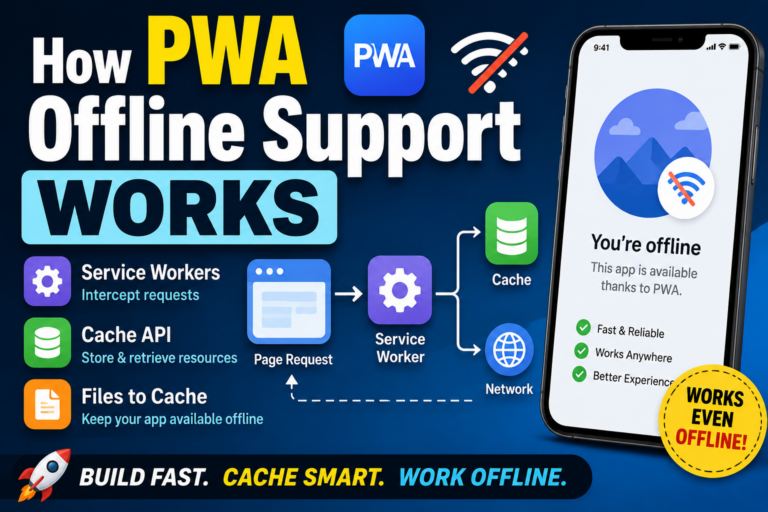
How PWA Offline Support Works: Service Workers, Cache API, and Files to Cache

How PWA Offline Support Works: Service Workers, Cache API, and Files to Cache Conclusion: PWA offline support works by saving required files in advance To make a PWA work offline, you usually use a Service Worker. In simple terms, the browser saves files such as HTML, CSS, JavaScript, and images in advance. Then, when there is no network connection, the app can display the page using those saved files. So PWA offline support is not magic. It works because the files needed to run the app have already been cached. What you need for offline support When you add offline support to a PWA, there are three main things to think about. Service Worker Cache API A list of files to cache A Service Worker works like a background layer between the page and the network. When the page tries to load a file, the Service Worker can decide whether to fetch it from the network or return a saved version from the cache. What does a Service Worker actually do? A Service Worker is different from regular JavaScript. It is not mainly used to move buttons or update UI elements on the page. It is used to manage network […]
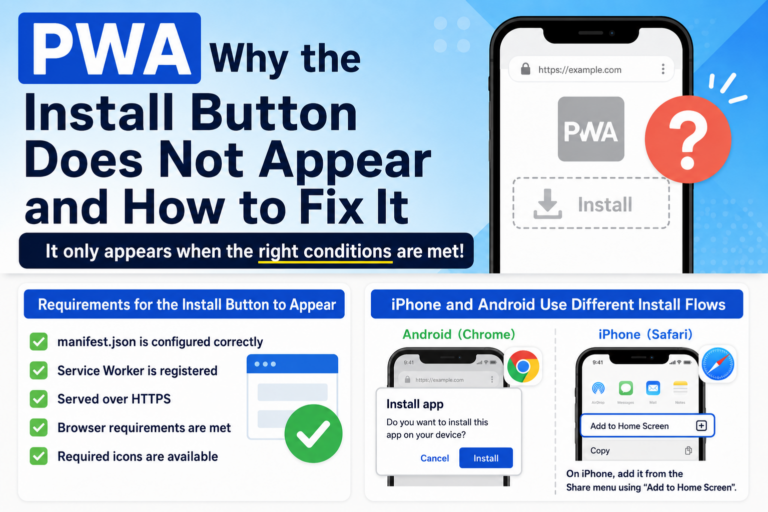
Why the PWA Install Button Does Not Appear: Common Causes and Fixes

Why the PWA Install Button Does Not Appear: Common Causes and Fixes Conclusion: the PWA install button only appears when the right conditions are met You may build what looks like a PWA, open it on a phone or PC, and still not see an install button. In most cases, this is not exactly a bug. It usually means the browser does not yet recognize the site as an installable web app. The common causes are a missing or incorrect manifest.json, an unregistered Service Worker, a non-HTTPS environment, or browser-specific install requirements that are not being met. A problem I ran into more than once While testing PWA behavior myself, I often hit the same confusing situation: the manifest was there, the page worked, but the browser still would not offer installation. That is what makes this problem annoying. From the outside, the site may look perfectly fine. But a PWA is not complete just because the HTML page works. The browser has to decide, “this is an installable web app.” If one required piece is missing, the install prompt may never appear. Cause 1: manifest.json is not being loaded correctly For a PWA, the Web App Manifest is one […]

Is PWA Dead? The Reality in 2026 and How to Use It Correctly

Is PWA Dead? The Reality in 2026 and How to Use It Correctly “Is PWA dead?” A few years ago, Progressive Web Apps were expected to replace native apps. The idea was simple: build once on the web, and deliver an app-like experience everywhere. But in 2026, the situation looks very different. PWA is not dead. But the assumptions behind it have completely changed. 1. Why PWA Was So Promising PWA was designed to bring app-like capabilities to the web. No installation required Distributed via URL Offline support Push notifications In theory, this meant you could replace native apps with a single web-based solution. At the time, many believed that app stores might eventually become unnecessary. 2. The Reality in 2026: A Split Ecosystem Today, PWA behaves very differently depending on the platform. iOS (iPhone) Limited PWA support Unstable Service Worker behavior Offline features are not reliable Push notifications are restricted As a result, PWA does not fully work as an app replacement on iOS. Android Stable Service Worker support Reliable offline capabilities Working push notifications Near-native app experience On Android, PWA is still a practical and powerful solution. In other words, PWA didn’t fail — it split into two […]

Why iOS Changes Your PWA URL When Adding to Home Screen (Fix & Causes)

When you add a web page to the iPhone home screen, the saved icon may open a different URL from the one you were viewing. I ran into this problem while building Petal. What I wanted was simple: open an individual page like /petal/{token} and add that exact page to the home screen. But in reality, when I opened it from the home screen, it jumped to another URL like /petal/@username. At first, I thought it was Safari cache or some mysterious iOS behavior. But the conclusion was much simpler. The cause was that I had written a fixed URL in start_url inside manifest.json. It was completely my mistake. The confusing part was that this mistake did not appear clearly from the beginning. What happened What I wanted to do was very simple. Open a different Petal card page for each user Add that page to the iPhone home screen Open that person’s page directly from the next time In other words, I wanted to keep the exact URL that was currently open on the home screen. But when I launched the added icon, it did not open the page I was viewing. It opened the fixed URL written in […]

What Can PWAs Do on iPhone in 2026? Safari Limits Explained

Progressive Web Apps (PWAs) are designed to make websites behave like native apps. However, on iPhone (Safari), PWA functionality is significantly limited. In this guide, we clearly explain what still works and what doesn’t in Safari as of 2026. Why Is PWA Limited on Safari? Safari has never fully supported PWAs compared to browsers like Chrome. After 2024, Apple introduced changes that further restricted PWA functionality. As a result, PWAs on iPhone are no longer reliable as a full app-like solution. What Works on Safari Despite the limitations, some features still work: Add to Home Screen (WebClip) Basic website rendering Light caching behavior Standard HTML, CSS, and JavaScript In short, Safari still supports normal web usage. What Doesn’t Work Properly Many core PWA features are limited or unstable: Reliable Service Worker behavior Full offline functionality True standalone app mode Consistent manifest support Stable cache control These limitations make PWAs unreliable on iOS. The Reality: WebClip Instead of Full PWA On iPhone, “Add to Home Screen” creates a WebClip, not a full PWA. Opens in Safari No real offline support No full app experience This is the most stable and realistic approach on iOS today. When Should You Use PWA? Recommended […]

How to Add a Website to Your iPhone Home Screen (2026 Guide)

How to Add a Website to Your iPhone Home Screen (2026 Guide) Did you know you can add any website to your iPhone home screen and use it like an app? This feature makes it easier to access your favorite tools, blogs, or services with just one tap. In this guide, we’ll walk you through how to add a website to your home screen step by step. What Does “Add to Home Screen” Do? “Add to Home Screen” allows you to save a website as an icon on your iPhone. Open the site instantly No need to search or bookmark Feels like launching an app This feature uses a system called WebClip. Step-by-Step Instructions 1. Open the Website in Safari First, open the website you want to add using Safari. 2. Tap the Share Button Tap the share icon (a square with an arrow pointing up) at the bottom of the screen. 3. Select “Add to Home Screen” Scroll down and tap “Add to Home Screen”. You can rename the icon if needed. Then tap “Add” to finish. Why It Might Not Work If you don’t see the option, check the following: You are using Safari (not Chrome or other […]

iPhone PWA Not Working? Common Causes and Practical Fixes

“Why is my PWA not working on iPhone?” If you’re asking this, you’re not alone. Since 2024, many developers and users have run into this exact issue. Here’s the truth: On iOS, PWAs often don’t work as expected due to Safari limitations. In this guide, we’ll break down the real causes—and show you fixes you can try immediately. 1. Safari Limitations (The Main Cause) On iPhone, all browsers use Safari’s engine (WebKit). This means PWA behavior is entirely controlled by Safari. After 2024, Apple restricted several PWA features: Unstable Service Worker behavior Incomplete manifest support Broken standalone (app-like) display So even if your setup is correct, PWA may still not behave properly. 2. Cache Issues (Old Version Still Showing) PWAs rely heavily on caching. Sometimes, the problem is simply that the old version is still being served. Common symptoms: Icon doesn’t update UI changes don’t appear Old content keeps showing This is not a bug— it’s how caching is designed to work. 3. Service Worker Not Updating Service Workers don’t update automatically in all cases. This can lead to: Old Service Worker still controlling the app New code not being applied Inconsistent behavior across sessions This is one of the […]

PWA vs WebClip: Which One Should You Use on iPhone in 2026?

PWA vs WebClip: Which One Should You Use on iPhone in 2026? Both PWA (Progressive Web Apps) and WebClip allow you to place a website on your iPhone home screen. At first glance, they may seem similar—but they are fundamentally different technologies. And in 2026, the answer to “which one should you use?” is almost already decided. What is a PWA? A PWA is a technology that allows websites to behave like native apps. Fullscreen app-like display Offline support Advanced caching with Service Workers In short, it tries to turn the web into an app experience. What is a WebClip? WebClip is a built-in iPhone feature that simply creates a shortcut on your home screen. Opens in Safari No special configuration required Highly stable behavior It’s simple—but reliable. The Reality in 2026 (Key Differences) Feature PWA WebClip iPhone Support Unstable Stable App-like Display Mostly unavailable Not supported Offline Capability Limited None Manifest Support Unreliable Not required Overall Stability Low High As you can see, most advantages of PWA no longer apply on iPhone. Why Did This Happen? After 2024, Apple made major changes to Safari and WebKit, significantly limiting PWA functionality. This caused issues such as: Unstable Service Worker behavior […]

Is PWA Dead on iPhone? The Reality in 2026 and What Still Works

Is PWA Dead on iPhone? The Reality in 2026 and What Still Works “Is PWA still usable on iPhone?” This question has become increasingly common since 2024. Here’s the short answer: PWA is not completely dead—but it no longer works as originally intended on iPhone. In this article, we’ll explain the current state of PWA on iOS and what you can actually do in 2026. 1. PWA Changed Significantly After 2024 In 2024, Apple made major changes to Safari. These changes were driven by regulatory requirements, but they had a huge impact on PWA behavior. Key changes include: Service Workers became unreliable Home screen apps changed their behavior Cache management became restricted As a result, the idea of “web apps behaving like native apps” became much harder to achieve on iPhone. 2. iPhone Now Uses WebClip Instead of Real PWA Today, when you use “Add to Home Screen” on iPhone, it works as a WebClip, not a full PWA. WebClip characteristics: Opens in Safari (not a standalone app) No true offline functionality Most manifest settings are ignored In simple terms, it’s just a shortcut—not a real app experience. 3. Why Some People Still Say “PWA Works” You might hear that […]

Why Your PWA Doesn’t Work on iPhone Safari and How to Fix It

“Why doesn’t my PWA work on Safari or iPhone?” This question has become increasingly common since 2024. The short answer is: PWAs no longer function in their original form on Safari. In this article, we explain clearly and simply why PWAs don’t work on Safari, and what actually changed between 2024 and 2026. 1. Safari Never Fully Supported PWAs First, it’s important to understand that Safari has always had limited PWA support. Compared to browsers like Chrome: Service Worker behavior is restricted Push notifications work differently Installation behavior is inconsistent In other words, Safari was never a browser that fully embraced PWAs. 2. Major Changes After 2024 (EU Regulations Impact) In 2024, Apple made significant changes to WebKit (Safari’s engine) to comply with EU regulations. As a result, key PWA features became unstable or stopped working: Service Workers no longer behave reliably Home screen apps lose standalone app behavior Cache behavior becomes inconsistent This didn’t come with a clear “PWA is discontinued” announcement, but the practical effect was the same: PWA became unreliable on Safari. 3. iPhone Now Uses WebClip Instead of Real PWA As of 2026, when you “Add to Home Screen” on iPhone, it behaves as a WebClip, […]

>OJapp Tips

OJapp Tips

PWA開発やWebデザインの現場で使える実践的なノウハウをお届けする「OJapp tips」。iOS特有の挙動ハックからmanifest.jsonの緻密な設計まで、ツール開発者が実機検証(PWA LAB)を繰り返して得た泥臭いリアルな知見を発信中。

私たちが運営する「Petal」は、その仕組みを使って“人のページを名刺のように持つ”ためのミニマルなSNS。QRからすぐ開けて、ログインなしでも見れる。でも、必要なときだけつながれる。そんな「弱いつながり」を未来へ残すために作られています。