This site uses the original WordPress plugin OJapp PWA Marketing.
Each article can be added to your Home Screen with its own dedicated icon.
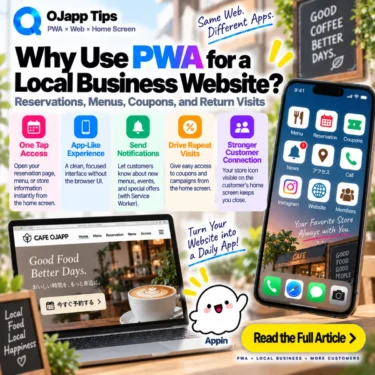
Restaurants, salons, clinics, shops, and other local businesses can use PWA in a very practical way.
That does not necessarily mean building a complete custom app for the business.
A local business website already contains information customers may check repeatedly before a visit.
Reservations, menus, opening hours, directions, and coupons can all become useful home screen entrances.
That alone can be a good reason to consider PWA for a local business website.
- 1 Local business websites are not always one-time visits
- 2 A returning customer should not always have to search for the business again
- 3 The reservation page can be the home screen destination
- 4 A menu can also become a home screen entry
- 5 A coupon page can live on the home screen too
- 6 You can also show something only during standalone launches
- 7 Use 1S1A when the whole business is the app
- 8 Use 1P1A when a specific page is what matters
- 9 Different businesses can become different home screen entrances
- 10 Small businesses do not always need a dedicated native app
- 11 This serves a different role from app-store discovery
- 12 The home screen is valuable only when the icon has a purpose
- 13 Explain the benefit instead of just saying “Add to Home Screen”
- 14 Local businesses fit naturally into home screen marketing
- 15 Start by asking what the customer will want to do next time
- 16 Your favorite local business can live on the home screen without a huge app
Local business websites are not always one-time visits
The first time someone discovers a business, they may arrive through Google Search, social media, maps, or another discovery service.
Search or social media
->
Business website
->
Check menu
->
Make reservation
After the first visit, the user’s needs can change.
They may simply want to know:
- Is it open today?
- Can I make a reservation?
- What is on the menu?
- Where is it?
- Is there a coupon?
The website now has a reason to be visited again.
A returning customer should not always have to search for the business again
Even when someone already knows a business, the normal web journey may still be:
Open browser
->
Search business name
->
Find official website
->
Open reservation or menu page
That works, but a repeat customer may not need the discovery step anymore.
With a PWA home screen entry, the journey can become:
Home screen
->
Tap business icon
->
Business website
The website does not need to be rebuilt.
The customer simply gets a shorter route back to an existing web experience.
 What I Learned by Using a Nonexistent URL: iPhone’s Hidden Home Screen Icon Behavior
The reservation page can be the home screen destination
For some businesses, the reservation page is used more often than the homepage.
A salon, for example, could create a journey like:
Home screen
->
“Book”
->
Reservation page
->
Choose date and time
The same idea can apply to restaurant tables, clinic appointments, salon treatments, and other booking flows.
A PWA does not have to launch at the top of the website.
The start_url can be designed around the useful launch destination.
I explore this launch model further in Why start_url: “.” Is So Useful for Page-Level PWAs.
A menu can also become a home screen entry
For a restaurant, customers may repeatedly care about the menu more than the website homepage.
The journey could be:
What should I eat today?
->
Tap the restaurant on the home screen
->
Open menu
->
Visit restaurant
If the business supports takeout or mobile ordering, the purpose becomes even clearer:
Home screen
->
Takeout menu
->
Order
Instead of treating the business website only as an online brochure, some pages can behave more like small web tools customers use before visiting.
A coupon page can live on the home screen too
Coupons are another easy way to understand the idea.
If a business already has a coupon page on the web, a customer could use it like this:
Open coupon page
->
Add it to the home screen
->
Open it from the home screen during the visit
->
Show the coupon
There is no need to keep a browser tab open for days or search through screenshots.
If the coupon needs an expiration date, redemption state, or protection against repeated use, however, those features still need to be implemented by the web service.
PWA does not automatically create a coupon management system.
You can also show something only during standalone launches
A web application can detect whether it is running in standalone display mode.
That makes it possible to present something specifically when the experience is opened from a PWA-style home screen context.
For example:
Launch in standalone mode
->
“Thanks for coming back”
->
Show a home-screen-specific message
I explain the implementation in How to Show Content Only When a PWA Is Opened from the Home Screen.
However, standalone detection should not be treated as strong authentication or proof that a specific trusted customer launched one particular icon.
If a high-value offer needs fraud prevention or strict redemption controls, use appropriate server-side authentication and redemption logic as well.
Use 1S1A when the whole business is the app
If the entire business website should behave as one application, the 1S1A (One Site. One App.) model is straightforward.
Business icon
->
Business homepage
->
Menu
Reservations
Directions
News
The customer keeps the business itself on the home screen.
This can make sense for a favorite restaurant, salon, clinic, or another service used regularly.
Use 1P1A when a specific page is what matters
In other cases, one page inside the business website may be the thing a customer actually wants.
For example:
/menu/
->
“Menu”

/reservation/
->
“Book”

/coupon/
->
“Coupon”
These can be designed as separate home screen entries when the site’s architecture supports page-level Manifests.
This is the idea behind 1P1A: One Page. One App.
Instead of keeping the entire website, the customer keeps the page or function they actually use.
Different businesses can become different home screen entrances
A user who regularly visits several businesses could keep each one on the home screen:
☕ Coffee Shop
🍜 Ramen Shop
✂️ Hair Salon
🏥 Clinic
Each entry still points to the web, but from the user’s perspective their frequently used places now have persistent icons.
They do not need to search an app store for a dedicated application from every small business.
And a business does not necessarily need to develop a native application just to gain a home screen entrance.
Small businesses do not always need a dedicated native app
A large chain may have good reasons to build a native application that combines loyalty programs, payments, mobile ordering, account systems, and other features.
A small restaurant or salon may not need the same scale of software.
If the main customer needs are:
- reservations
- menus
- opening hours
- directions
- news
- coupons
the existing website may already provide most of the functionality.
In that case, this can be enough:
Existing business website
+
Home screen entrance
Instead of asking “How do we build an app?”, it may be more useful to ask “How can returning customers reach us more easily?”
This serves a different role from app-store discovery
A PWA home screen strategy is not identical to distributing a native application through an app store.
An app-store listing can provide its own discovery channel.
The local business PWA model discussed here is mainly about what happens after someone already knows the business.
Does not know business
->
Discovers it through search, social media, maps, or recommendations
->
Visits website
->
Likes the business
->
Keeps it on the home screen
->
Returns directly next time
PWA does not replace every acquisition channel.
It can create another return path after the initial discovery has already happened.
The home screen is valuable only when the icon has a purpose
The smartphone home screen contains applications and tools the user has chosen to keep close.
A business entry there can be easier to find than an old browser tab or a previous search result.
But being added to the home screen does not guarantee another visit to the business.
The icon needs a practical reason to exist:
Book faster
Check the menu quickly
Open a coupon
Check opening hours
The goal should not simply be to collect home screen installations.
The entry should make a repeated customer task easier.
Explain the benefit instead of just saying “Add to Home Screen”
A local business does not need to explain PWA technology to customers.
For a booking page, the message could be:
Visit us often?
Book directly from your home screen next time.
For a menu:
Keep our menu on your home screen
for quick access next time.
For a coupon:
Keep this coupon on your home screen.The important part is explaining what becomes easier afterward.
Local businesses fit naturally into home screen marketing
I use the term home screen marketing for the idea of letting users keep useful web entrances on their own home screen.
The model is particularly easy to understand for local businesses:
Discover business through search or social media
->
Visit
->
Like the business
->
Keep the business or booking page on the home screen
->
Return directly next time
This is different from repeatedly sending Push notifications asking the customer to return.
The customer keeps the entrance and opens it when they actually need it.
It is a quieter return path.
Start by asking what the customer will want to do next time
The first question when adding PWA to a local business website does not need to be technical.
Ask what a returning customer wants to do on their next visit to the website.
Book again
->
Reservation page

Check the menu
->
Menu page

Check opening hours
->
Business information

Use a benefit
->
Coupon page
Once the purpose is clear, the useful home screen destination becomes much easier to identify.
It might be the entire business.
It might be reservations.
It might be the menu.
And if different users value different pages, page-level PWA design can provide more than one kind of entrance.
Your favorite local business can live on the home screen without a huge app
Digital strategy for local businesses often quickly turns into discussions about custom apps, loyalty apps, and Push notifications.
Those systems can absolutely be useful when the business needs them.
But it is also possible to start much smaller.
Keep the existing website.
Keep the existing booking page.
Keep the existing menu.
Let customers who find those URLs useful keep them on their own home screen.
The value of PWA for a local business is not limited to building a large custom business app. It can simply create a direct home screen entrance back to a place the customer already wants to visit again.

Add OJapp Tips as a preferred source on Google
Make it easier to find OJapp Tips articles in Google Search.