This site uses the original WordPress plugin OJapp PWA Marketing.
Each article can be added to your Home Screen with its own dedicated icon.
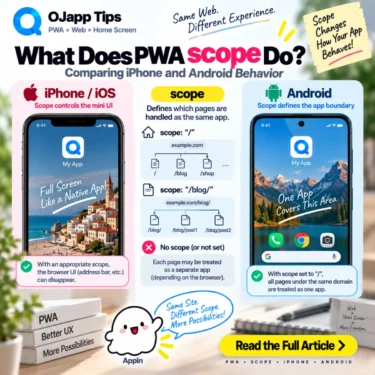
The Web App Manifest has a field called scope.
It is commonly described as the URL range that belongs to the PWA.
That sounds simple enough.
But when I started building and testing multiple PWAs on iPhone and Android, scope became one of the Manifest fields that caused the most unexpected behavior.
On Android, it affected how I could separate multiple PWAs on the same site. On iPhone, it also affected how pages looked when opened from the home screen in my tests.
The same scope configuration did not produce the same practical result across the two platforms.
Using real-device observations from PWA LAB, let’s look at what scope actually changes.
- 1 scope defines the navigation range of a PWA
- 2 A root scope covers a very large part of the site
- 3 The problem appears when one site needs multiple PWAs
- 4 On Android, scope strongly affected my multi-app design
- 5 scope does not always need to be written explicitly
- 6 On iPhone, I found another reason to care about scope
- 7 One identical Manifest became inconvenient
- 8 I ended up serving different scope configurations
- 9 scope also matters when thinking about display behavior
- 10 A narrower scope is not automatically better
- 11 A broad scope makes sense for 1S1A
- 12 scope becomes more complicated in 1P1A
- 13 start_url and scope solve different problems
- 14 Do not add scope: “/” just because a sample Manifest has it
scope defines the navigation range of a PWA
Consider this Manifest:
{
  "name": "My App",
  "start_url": "/app/",
  "scope": "/app/",
  "display": "standalone"
}
Here, URLs under /app/ are within the declared scope.
/app/
/app/page-a/
/app/page-b/
URLs such as:
/blog/
/product/
are outside it.
In simple terms, scope tells the browser: this is the navigation boundary of this web application.
A root scope covers a very large part of the site
A common configuration is:
"scope": "/"That gives the PWA a navigation scope covering the root of that origin and its descendants.
For a site such as:
example.com/
├─ news/
├─ tools/
├─ products/
└─ profile/
this can make perfect sense if all of those areas belong to one application.
It fits naturally with what I call 1S1A: One Site. One App.
I explain that app-unit distinction in The Two Directions of PWA Design: 1S1A and 1P1A.
 iOS and Android Have Different Goals for PWAs: The Real Difference Beyond Support or No Support
The problem appears when one site needs multiple PWAs
This is where I ran into trouble in PWA LAB.
I had separate services under the same domain that I wanted to treat as different home screen applications.
For example:
example.com/lab/
example.com/petal/
They had different names and icons, so from my design perspective they were different apps.
But on Android, using a broad scope: "/" for both created a conflict with that model.
In my LAB and Petal tests, both Manifests declared the root as their scope. Android then treated the configuration as overlapping the same broad application area instead of behaving the way I wanted for independent home screen apps.
On Android, scope strongly affected my multi-app design
That experiment changed how I think about root scope.
If the entire site is one PWA, a broad scope is reasonable.
But if the intended design is:
/lab/ -> LAB App
/petal/ -> Petal App
then declaring the entire root as the application range does not match that separation very well.
The issue becomes even more important in page-level designs such as 1P1A, where multiple pages may need to exist as separate home screen entries.
scope does not always need to be written explicitly
Another useful detail is that scope is not a field you must manually include in every Manifest.
If scope is omitted, the browser derives a default scope based on the start_url.
That means there are situations where explicitly declaring a broad scope provides no benefit.
For my Android-oriented 1P1A configuration, I use this idea and avoid forcing a broad scope when I do not need one.
On iPhone, I found another reason to care about scope
This is where the experiment became especially interesting.
On Android, I wanted to avoid an unnecessarily broad scope so that multiple app-like entries could remain separate.
But during iPhone home screen testing, I observed cases where the scope boundary also affected the presentation after navigation.
In my PWA LAB tests, keeping the intended pages within the declared scope helped preserve the home-screen-style presentation and avoid the small Safari-related UI that appeared in some configurations.
That created two different practical requirements:
Android
->
Avoid an unnecessarily broad scope

My iPhone configuration
->
Use scope to keep the intended navigation inside the app area
This was not what I expected when I first treated scope as a simple Manifest field.
One identical Manifest became inconvenient
At first, I naturally tried to serve the same Manifest configuration to both iPhone and Android.
Real-device testing made that increasingly awkward.
A scope configuration that helped the iPhone presentation could interfere with the multi-app structure I wanted on Android.
Removing the explicit scope worked better for my Android page-level setup, while the iPhone configuration benefited from having the intended navigation range declared.
Eventually, I stopped insisting that both platforms receive exactly the same Manifest.
I ended up serving different scope configurations
The practical solution in PWA LAB was simple:
iPhone
->
Explicit scope

Android
->
No explicit scope
The environment can be detected and an appropriate Manifest generated for each case.
Conceptually, the iPhone version might contain:
{
  "start_url": ".",
  "scope": "/petal/",
  "display": "standalone"
}
while the Android-oriented version can omit the explicit scope:
{
  "start_url": ".",
  "display": "standalone"
}
This is not a universal rule saying that every iPhone PWA should have scope and every Android PWA should omit it.
It is the configuration that worked best for my page-level PWA architecture after testing the same service on both platforms.
scope also matters when thinking about display behavior
It is misleading to think of scope simply as the range where an application can be installed.
It defines the PWA’s navigation boundary.
When navigation moves outside that boundary, the browser can treat the destination as outside the application’s navigation scope, and presentation can change.
This is why scope also becomes relevant when testing display modes such as standalone and fullscreen.
As discussed in PWA standalone vs fullscreen: What’s the Difference and Which Should You Use?, the final presentation of Manifest display settings can vary by platform and browser.
scope deserves the same kind of real-device testing.
A narrower scope is not automatically better
After seeing the problems caused by an overly broad scope, it might be tempting to make every scope as narrow as possible.
That can create a different problem.
Suppose your PWA uses:
"scope": "/app/"but normal application navigation also needs:
/account/
/settings/
/help/
Those destinations are outside the declared scope.
If they are intended to feel like normal parts of the same application, an overly narrow scope can work against that UX.
So scope is not about making the smallest or largest possible range.
It should describe the navigation area that actually belongs to the PWA.
A broad scope makes sense for 1S1A
If the entire website is one application, a broad scope is easy to understand.
example.com/
->
Everything belongs to My App
In that architecture, scope: "/" can accurately represent the product.
scope becomes more complicated in 1P1A
1P1A takes a different approach.
Individual pages can become separate home screen apps:
/timer/
->
Timer App

/compressor/
->
Compressor App

/profile/alice/
->
Alice App
If every one of those Manifests declares scope: "/", the Manifest says that each app has the same site-wide navigation boundary while the architecture is trying to treat them as separate page-level apps.
That is why I no longer add scope automatically in a 1P1A design. I first ask whether an explicit scope is actually needed.
start_url and scope solve different problems
These two Manifest fields often appear together, so they are easy to mix up.
A simple way to separate them is:
start_url
->
Where the app starts

scope
->
How far its navigation area extends
For example:
"start_url": "/app/dashboard/",
"scope": "/app/"
The PWA starts at the dashboard, but its declared navigation scope includes the rest of /app/.
They are related, but they do different jobs.
Do not add scope: “/” just because a sample Manifest has it
Many example Manifests include scope: "/".
That can be perfectly reasonable for a site-wide PWA.
But for multiple PWAs, directory-level apps, or page-level apps, that single line can define a much larger application boundary than you intended.
I learned that directly when my LAB and Petal configurations collided on Android.
scope is not a field you add simply because you are building a PWA. It is a field that defines how far that PWA extends.
Use a broad scope when the whole site belongs to one app.
Use a directory scope when that directory represents the application.
For page-level multi-app designs, consider whether an explicit scope is needed at all.
And do not assume iPhone and Android will present every scope configuration identically. Test the actual navigation on both.
Next, I will look at another Manifest field that becomes important when multiple PWAs are involved: id. What does it identify, and what happens if you leave it out?

Add OJapp Tips as a preferred source on Google
Make it easier to find OJapp Tips articles in Google Search.